Microsoft Copilot 2026 — Platform, Agents, Skills and Enterprise AI
From AI-powered productivity to intelligent, agentic work across Microsoft platforms
Microsoft Copilot is Microsoft's expanding family of AI-powered experiences, agents and capabilities that help individuals and organisations create content, analyse information, develop solutions and execute complex work through natural-language interaction.
Originally introduced as an AI assistant embedded within Microsoft 365 applications, Copilot has evolved into a broader enterprise AI experience combining advanced AI models, organisational intelligence, application-native tools, reusable Skills and autonomous agents.
Today, supported Copilot experiences can plan and undertake sophisticated, multi-step work across applications, often completing activities that would otherwise require considerable specialist application knowledge and time.
Users can describe their intended business outcome through written prompts, spoken instructions and supported multimodal interactions, including visual context, rather than having to perform every technical step themselves.
This represents a fundamental change in how people interact with software: from learning how to use applications to directing applications to deliver business outcomes.
Availability varies by licence, application, tenant configuration and product release.
Microsoft Copilot
AI-powered experiences, agents, skills and intelligence
Copilot experiences
HomeCopilot ChatCoworkCode · Autopilot
Copilot across Microsoft 365 apps
Cross-app Copilot ChatWork across apps using the context available to you.In-app CopilotPlan, create, analyse and edit complex work directly in Microsoft 365 apps.WordExcelPowerPointOutlookTeamsSharePointOneDriveand more…
Copilot Chat supports agents. Premium includes qualifying agent use. On Basic, agents that access shared organisational data require metered billing. Agent licensing
Microsoft first-party agents and capabilities
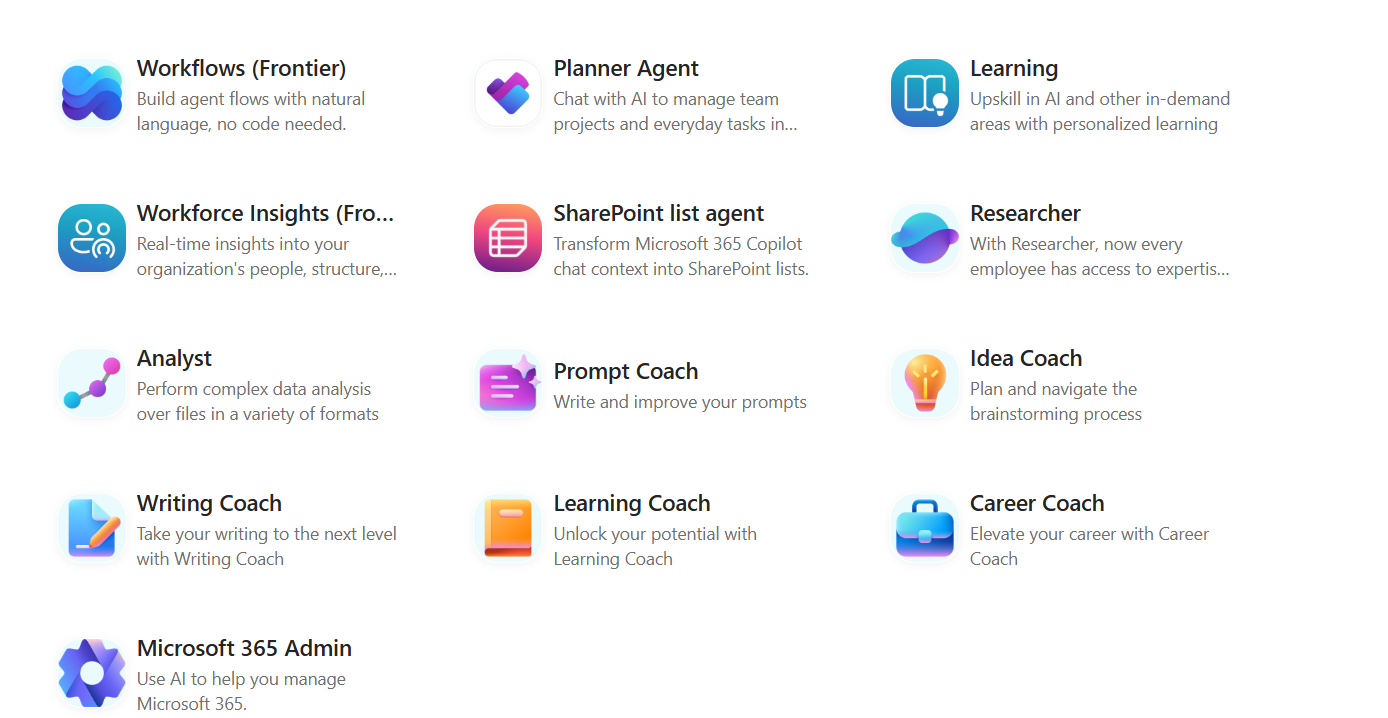
ResearcherAnalystCreateAgent BuilderPlanner AgentPrompt CoachWorkflowsIdea CoachLearning CoachWriting CoachCareer Coachand more…Built-in agents and tools for specific tasks
Agents, skills and extensibility
Build and extend agentsAgent BuilderNo-code agent buildingMicrosoft Copilot StudioLow-code agent developmentMicrosoft FoundryPro-code agent developmentCustom agents · Skills · Plug-ins · Connectors · MCP · Tools Extend Copilot and connect business systems
Microsoft IQ
Work IQPeople, collaboration and workflows
Fabric IQBusiness entities, systems of record and actions
Foundry IQPolicies, documents and knowledge bases
Web IQWeb pages, news, images and video
Models, orchestration and governance
AI models · Copilot Harness · Security · Administration Execution, controls and management
BDATech365 independent reference showing conceptual groupings. Microsoft product marks belong to Microsoft.
Modern organisations generate and manage increasing volumes of emails, meetings, documents, spreadsheets, presentations, business data and collaborative information.
Employees often spend substantial time finding information, preparing content, analysing data and coordinating activities across multiple applications.
Microsoft Copilot addresses these challenges by combining generative AI, organisational context and application functionality to help users work more efficiently and focus on higher-value activities.
Key opportunities include:
Productivity: Reduce time spent on repetitive administration, content creation and information retrieval.
Knowledge discovery: Find and interpret relevant information across permitted organisational resources.
Advanced application capabilities: Make sophisticated Excel, Word, PowerPoint and other application functionality accessible through natural language.
Business analytics: Explore information, identify patterns and generate insights.
Process automation: Use agents and tools to coordinate activities across applications.
Organisational consistency: Apply reusable instructions, Skills, templates and brand assets.
Accessibility: Reduce the technical knowledge required to undertake complex digital tasks.
The business opportunity extends beyond performing existing tasks more quickly. Copilot can also enable new ways of working that were previously impractical for many users.
2. What is Microsoft Copilot?
Microsoft Copilot is an AI assistant for work. In Microsoft 365, it helps people draft content, summarise information, analyse data and act on what they find. People can work with Copilot across tasks in Copilot Chat or use it directly in supported apps such as Word, Excel and Teams.
Copilot can draw on the information available to it in each experience, such as a file supplied by the user or work content they have permission to access. Agents extend Copilot to defined tasks, such as answering questions from an approved policy library. The available capabilities depend on the licence, app and organisation's settings.
Scope of this guide
Microsoft offers dozens of Copilot experiences across products and platforms, from Azure to Windows, and is making those experiences more consistent. This guide provides a structured introduction to Microsoft Copilot for work. It focuses on the app previously called Microsoft 365 Copilot and on how Copilot supports cross-app and in-app business productivity across Microsoft 365.
Conversational analytics extends that experience into the flow of work. In Power BI, users can ask natural-language questions in the standalone Copilot experience. In Microsoft Copilot, users can ask about Power BI reports and semantic models they have permission to access, or work with a published Fabric data agent connected to approved data sources. For example, a sales manager can ask which regions missed their targets last quarter and get an answer grounded in governed business data. Availability depends on the experience and organisational settings. Copilot in Power BI · Power BI data in Microsoft Copilot · Fabric data agents in Microsoft Copilot
3. Microsoft Copilot — History and Evolution (2023–2026)
Microsoft announced Microsoft 365 Copilot on 16 March 2023, introducing generative AI into familiar productivity applications through large language models and Microsoft Graph organisational context.
Its initial capabilities focused on drafting, summarising, generating content and answering questions within applications such as Word, Excel, PowerPoint, Outlook and Teams.
Microsoft 365 Copilot became generally available to enterprise customers on 1 November 2023, following the announcement of its commercial add-on licensing model.
Since then, Copilot has undergone several significant developments.
Microsoft extended its shared foundation for agent execution across supported experiences and introduced the harness in public preview in Microsoft Foundry Agent Service.
The evolution has been from conversational assistance towards coordinated execution of work, supported by increasingly sophisticated AI models, tools, organisational intelligence and governance.
4. How Microsoft Copilot Works — Architecture, Grounding and Orchestration
Microsoft Copilot combines AI models, user instructions, contextual information, application tools and governance controls to generate responses and undertake supported actions.
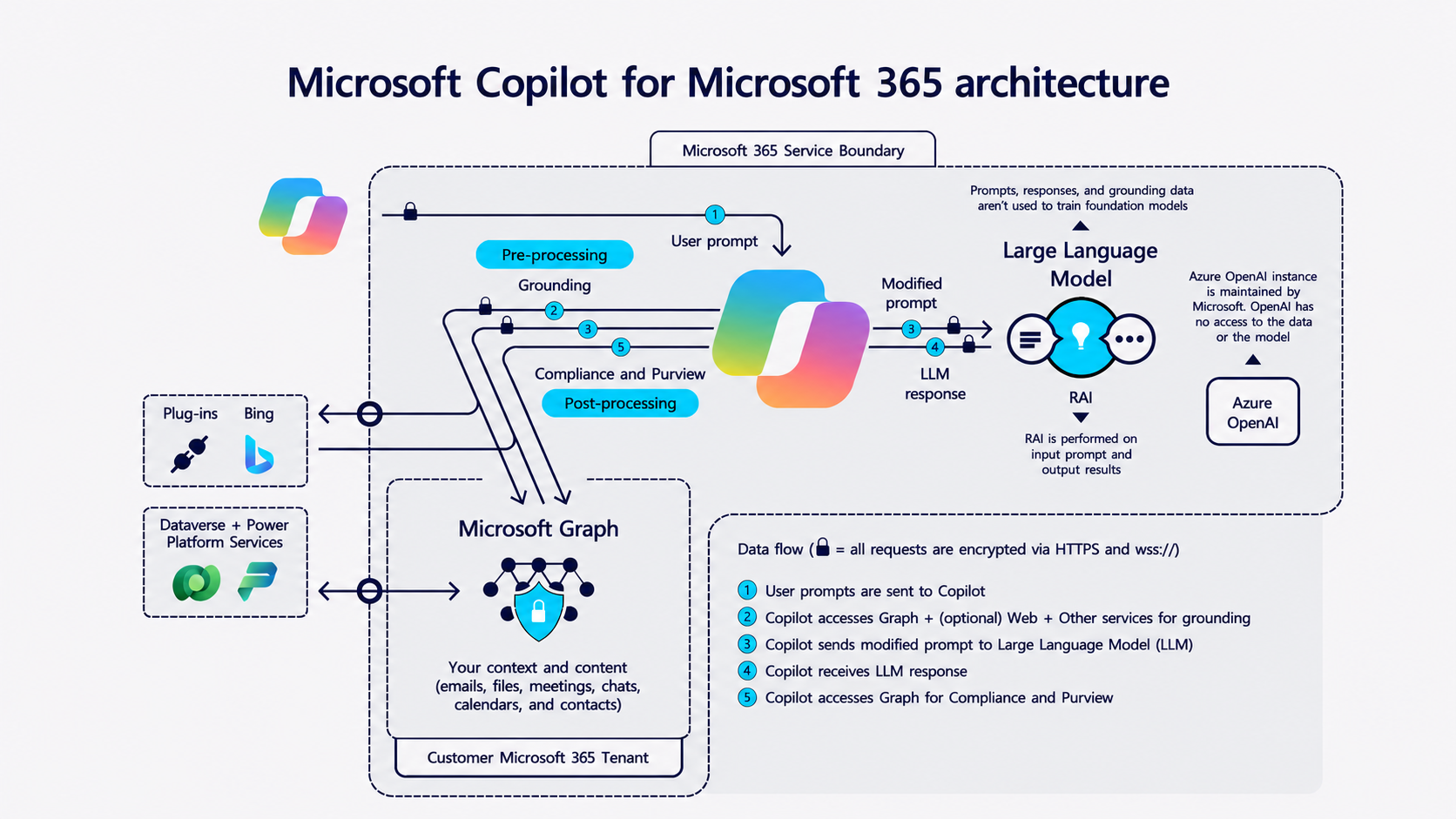
The original Microsoft 365 Copilot architecture was commonly explained through a request-processing sequence involving user prompts, Microsoft Graph grounding, large language models and post-processing.
That remains a useful foundation for understanding how Copilot produces grounded responses.
However, the modern architecture is broader, reflecting multi-model AI, advanced application capabilities, agents, Skills and more sophisticated execution environments.
From Orchestration to the Microsoft Copilot Harness
A harness can be understood conceptually as the combination of orchestration and the wider execution environment surrounding an AI model.
It coordinates the instructions, context, tools, execution state and controls needed to undertake work.
Microsoft's shared Copilot Harness reflects increasing convergence across its agentic experiences, including supported Cowork and development scenarios.
The harness does not replace the need for grounding, permissions or governance. Instead, it provides a broader execution framework through which models and tools can work together.
The diagram illustrates the original request flow and is adapted from Microsoft material. Microsoft now also identifies Web IQ as a web grounding capability that powers Copilot. View the full-size graphic.
Copilot Managed Runtime (preview)
Microsoft Copilot Managed Runtime extends the platform's ability to host and operate supported AI-generated applications within managed environments.
It is part of Microsoft's wider movement towards application creation and execution through agentic AI.
Detailed development and runtime architecture are outside the scope of this introductory platform guide.
5. Microsoft Copilot Chat vs Paid Microsoft Copilot
Microsoft offers Copilot experiences through eligible Microsoft 365 subscriptions, alongside additional paid Copilot licensing and usage-based services.
The distinction is particularly important when considering access to organisational information, advanced application capabilities, agents and more complex workloads.
Capability
Copilot Chat with eligible Microsoft 365 licence
Paid Microsoft Copilot
Access
Included with eligible subscriptions
Additional paid user licence
Conversational AI
Supported conversational AI
Enhanced work-grounded Copilot experiences
Web information
Web-grounded responses where enabled
Web-grounded responses where enabled
User-supplied files
Supported uploads and contextual files
Supported uploads and organisational file references
Organisational intelligence
Selected contextual and agent experiences
Broader Work IQ-grounded experiences
Microsoft 365 applications
Selected integrated experiences
Deeper application-native Copilot capabilities
Agents
Supported agents, with some capabilities requiring usage-based billing
Broader included capabilities, with additional consumption charges for certain services
Advanced agentic work
Dependent on entitlement
Cowork: Requires a Copilot licence. Tasks are metered in Copilot Credits. Code (Frontier): For work accounts, requires a Copilot licence and administrator enablement. Usage counts against the Copilot entitlement, and Microsoft lists Code under usage-based billing for Copilot Credits. Copilot Credits billing · Code requirements
Governance
Enterprise data protection and applicable administration controls
Additional management, reporting and governance capabilities
Important: Paid licensing does not necessarily mean unlimited use of every advanced agentic capability. Some services require additional usage-based billing.
User Subscription Licensing (USL): A per-user subscription providing access to defined Copilot capabilities.
Usage-Based Billing (UBB): Consumption charges associated with supported services and agentic workloads, including those using Copilot Credits.
Complex work involving multiple execution steps, tools and deliverables may consume more resources than conventional conversational interactions.
Organisations therefore need to consider both user licensing and ongoing consumption management.
6. Working with Files and Organisational Context
One of Copilot's most useful capabilities is the ability to work with information supplied by users or retrieved from permitted organisational resources.
In Copilot Chat, users can upload supported files to provide additional context for their questions and tasks.
Paid Copilot experiences can provide broader access to organisational context through Work IQ, Microsoft Graph and associated services.
Supported interfaces allow users to reference information such as:
Files and documents
People and organisational relationships
Emails and meetings
Teams chats and channels
SharePoint sites
Agents and Skills
Connected analytical information, including supported Fabric experiences
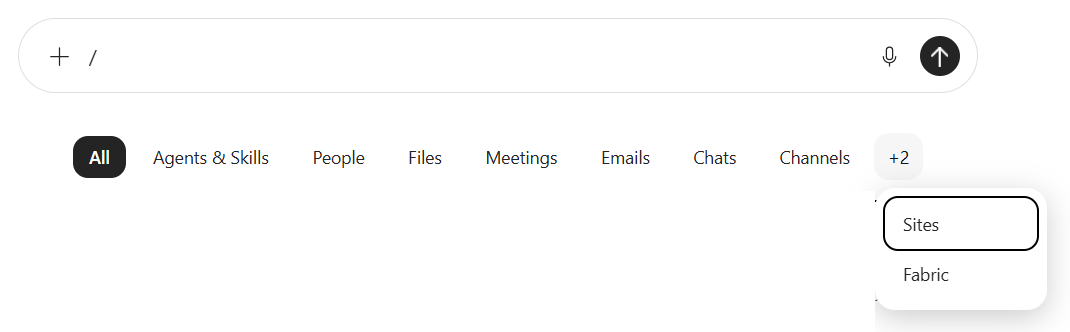
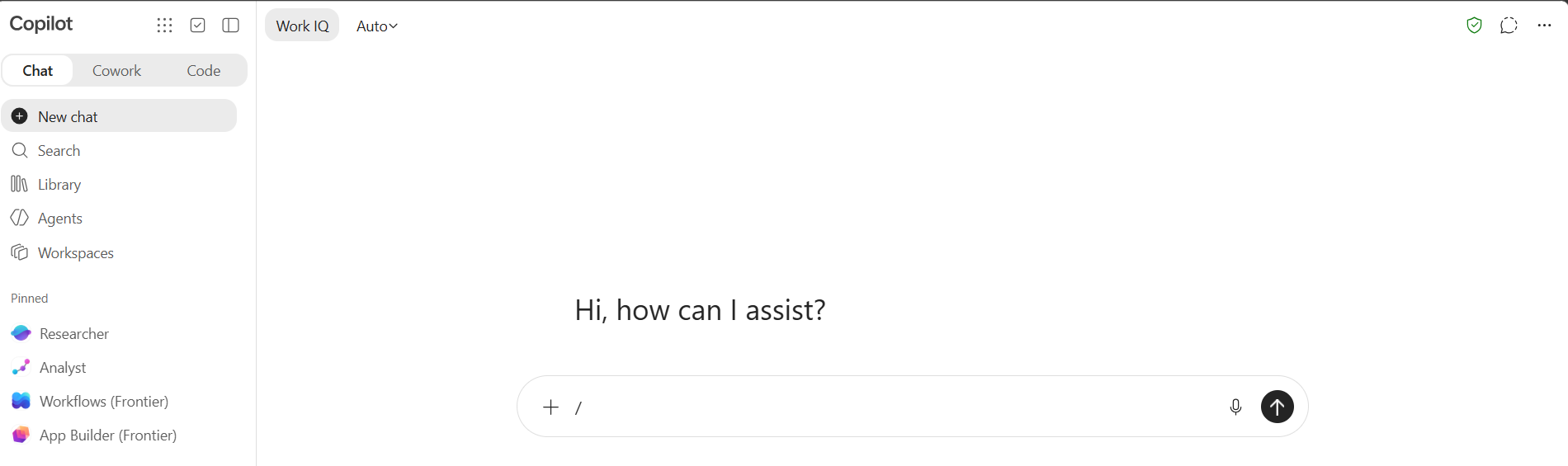
In supported Copilot interfaces, typing / in the prompt box opens a context picker that helps users select relevant information.
This enables users to move from generic questions towards requests grounded in their own work and business information, subject to access permissions and organisational policies.
The forward slash opens the context picker in Copilot Chat. The additional categories menu shows Sites and Fabric. Result details are obscured.
For further guidance on adding files and organisational context, see the BDATech365 Microsoft 365 2026 Platform Guide.
Copilot Library, Workspaces and Projects
Copilot Library is where users can return to content created with Copilot, including generated images and Copilot Pages. Copilot Library overview.
Copilot Workspaces are designed for teams to share files and pages and work with Copilot on an ongoing workstream. Microsoft began rolling out the change from Copilot Notebooks to Workspaces in phases in late October 2026. Existing notebooks move automatically and retain their content and sharing settings.
Copilot Projects organise an individual's chats, tasks, files and results in one place on Home for use with Copilot Chat and Cowork. Home and Workspaces are rolling out in phases, so availability may vary by organisation. Copilot Workspaces and Projects.
7. Advanced In-App Copilot — From Assistance to Application-Native Execution
One of the most significant developments in Microsoft Copilot is its ability to plan and execute complex work directly within supported Microsoft 365 applications.
Earlier Copilot experiences largely focused on producing text, summaries, suggestions and answers.
Modern in-app Copilot experiences can increasingly manipulate application content, create structured deliverables, use specialised tools and perform sequences of operations on behalf of users.
Tasks that previously required considerable application knowledge can now be initiated and refined using natural-language prompts.
Planning, editing and reviewing work
Supported application experiences provide combinations of:
Plan: Interpret the required outcome and establish an approach to completing the work.
Edit with Copilot: Create or modify content directly within the application.
Review and control: Inspect proposed changes, review highlighted differences and approve or reject modifications where supported.
These are complementary interaction patterns rather than three universally identical modes across every Microsoft 365 application.
Human review remains particularly important for business-critical outputs.
Advanced capabilities across Microsoft 365 applications
Claude models from Anthropic helped expand what Copilot could do in core Microsoft 365 apps. Microsoft first introduced Claude in Researcher and Copilot Studio, then announced rollout to supported in-app Copilot experiences in Word, Excel and PowerPoint. Alongside Agent Mode and app-specific tools, this expanded model choice supports more substantial work, such as revising a document, analysing a workbook or building a presentation from a prompt. Model availability varies by app, licence, rollout and administrator settings. Microsoft AI at Work roadmap
Logo
Application
Examples of advanced Copilot capabilities
Excel
Prepare and clean datasets, generate formulas, restructure worksheets, perform analysis, create visualisations and develop interactive dashboards
Word
Draft and edit complex documents, restructure content, populate structured templates using source information and support document review
Create and modify supported sites, pages, lists and content; assist with lightweight business solutions and connected information experiences
Teams
Analyse meetings and conversations, identify decisions and actions, and support collaborative workflows
OneDrive
Discover, summarise, compare and work with files, including supported advanced content operations
Capabilities vary across desktop, web and preview experiences.
Example: Building an analytical workbook in Excel
A user can describe the required analytical outcome and ask Copilot to undertake a sequence of activities, such as:
Preserve the original source data and create a separate working worksheet.
Identify and resolve data quality issues.
Structure the cleaned information into appropriate tables.
Create formulas, calculations and analytical summaries.
Develop charts, interactive filters and dashboard views.
Review the resulting workbook and refine the presentation.
This illustrates a shift from Copilot explaining Excel functionality to Copilot helping produce a complete analytical deliverable.
The user remains responsible for validating calculations, assumptions and the resulting business insights.
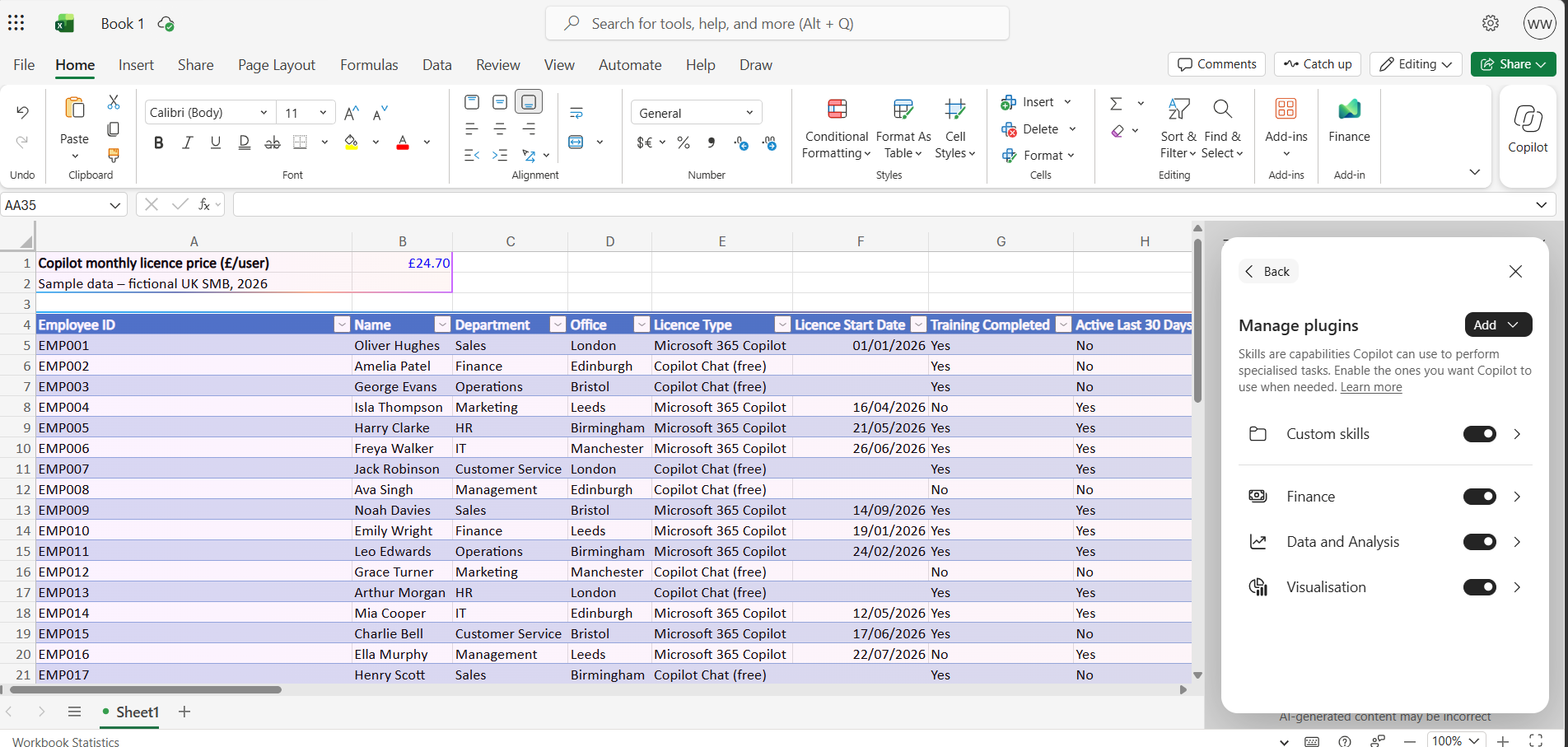
This in-app editing example shows a fictional sample dataset created with Copilot in Excel. The edits are pending user approval, and the Copilot pane shows Manage plugins. View the full-size screenshot.
Example: Document generation and editing in Word
Copilot can assist with sophisticated document production, including working with existing unstructured content and populating structured documents from relevant source material.
Potential business applications include proposals, reports, project documentation, meeting outputs and standardised business templates.
Supported editing and review capabilities allow users to inspect and refine results rather than simply accepting generated text.
Example: Branded presentations using Microsoft Create
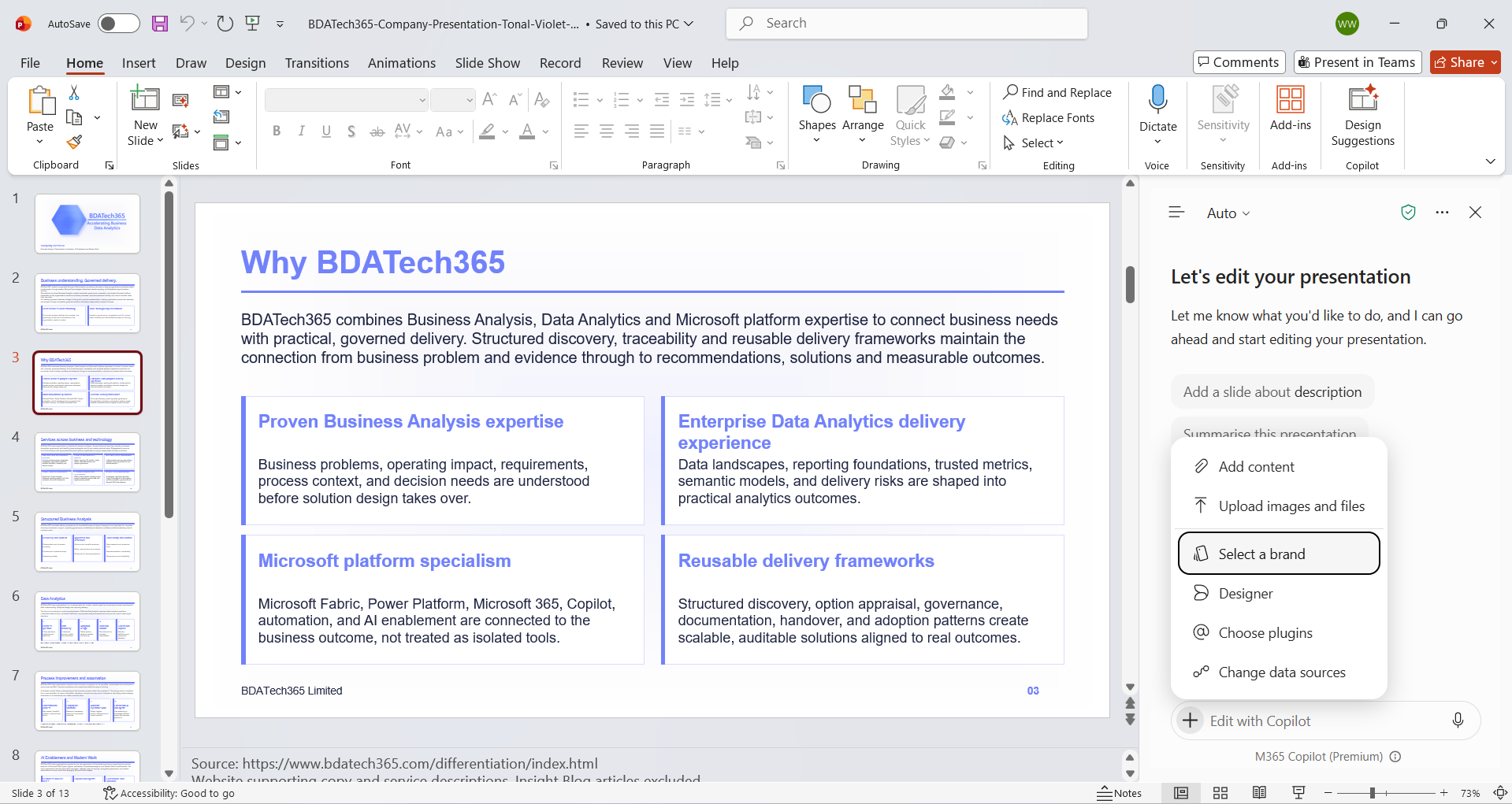
Microsoft Create provides capabilities for developing reusable brand assets and Brand Kits.
These can support consistent presentation creation in PowerPoint, including approved colours, typography and visual identity.
Combined with advanced presentation generation and editing, this can substantially reduce the effort involved in producing professional, consistently branded content.
The Select a brand option in PowerPoint’s Copilot pane, shown alongside a branded BDATech365 slide. View the full-size screenshot.
Example: SharePoint business solutions
Supported Copilot and agent experiences can assist with creating and managing SharePoint sites, pages, lists and business content.
Advanced scenarios may include generating sample data, creating connected views and developing lightweight analytical experiences using SharePoint information.
These capabilities demonstrate how Copilot increasingly overlaps with traditional low-code solution development, although more complex business applications may still require Power Apps, Power Automate, Power BI or other specialised technologies.
8. Microsoft Copilot Agents
Agents extend Copilot beyond general-purpose conversation by providing specialised capabilities, instructions, tools and access to relevant information.
They can support tasks such as research, analysis, planning, learning, content creation, administration and business process execution.
Microsoft provides a growing range of first-party agents, alongside capabilities for organisations to create and manage their own.
Microsoft-built agents
The Microsoft Copilot Agent Store provides access to Microsoft-built and other available agents, depending on licensing and tenant configuration.
Agent StoreBuilt by Microsoft
Examples of Microsoft-built agents in the Copilot Agent Store.
Representative Microsoft agents
Logo
Agent
Primary purpose
Example use case
Researcher
Research and synthesis
Investigate a market, industry or business topic
Analyst
Data analysis and interpretation
Analyse business information across supported files
Planner Agent
Project and task management
Coordinate plans and activities
SharePoint list agent
SharePoint list creation
Convert business information into structured lists
Workflows
Natural-language workflow creation
Create supported agent flows
Workforce Insights
Organisational workforce insights
Explore workforce information and trends
Prompt Coach
Prompt development
Improve instructions and prompting techniques
Idea Coach
Ideation and brainstorming
Structure and develop business ideas
Writing Coach
Writing assistance
Improve clarity, structure and communication
Learning Coach
Learning support
Develop knowledge and understanding
Learning
Personalised learning
Explore professional development topics
Career Coach
Career development
Explore skills and career progression
Microsoft 365 Admin
Administration assistance
Support Microsoft 365 management tasks
Some agents are available through Frontier or other controlled release programmes.
Microsoft also provides dedicated Word, Excel and PowerPoint creation agents in supported Copilot experiences, enabling users to initiate document, workbook and presentation creation directly from Copilot.
Agent capabilities and availability are subject to change.
9. Skills — Reusable Expertise for Copilot and Agents
Skills represent another significant development in the evolution of Microsoft Copilot.
Rather than repeatedly providing detailed instructions for individual tasks, users and organisations can increasingly package reusable knowledge, instructions and working practices into Skills.
A Skill can help an AI experience undertake a particular type of work consistently, drawing upon defined guidance and available capabilities.
Potential applications include:
Standardised business analysis documentation
Repeatable data preparation and analytical activities
Consistent reporting and presentation practices
Document quality assurance
Organisational writing and branding standards
Specialist business workflows
Agents, Skills and Tools — What's the Difference?
Capability
Primary role
Agents
Specialised AI experiences that undertake tasks and workflows
Skills
Reusable expertise and task-specific instructions
Tools and connectors
Provide access to information, applications and actions
MCP and other protocols
Support interoperability between AI experiences and external capabilities
Skills can help organisations capture and reuse expertise, improving consistency and reducing dependence on repeatedly constructing detailed prompts.
Their implementation, distribution and governance depend on the supported Copilot or agent environment.
10. Copilot Cowork, Code and Autopilot
Microsoft Copilot's expanding agentic experiences demonstrate a shift from individual conversational interactions towards more sophisticated execution of work.
Copilot Cowork
Microsoft lists Cowork as generally available for eligible tenants in supported languages. Usage is billed through Copilot Credits. Cowork release notes.
Copilot Cowork is designed for complex, multi-step activities that may involve several applications, tools and deliverables.
Users can describe a desired outcome, allowing Cowork to plan and undertake supported activities while maintaining appropriate user oversight.
Examples include preparing documents, coordinating meetings, organising information and producing multiple related outputs.
Longer-running activities introduce additional considerations around execution time, consumption, approvals and monitoring.
Copilot Code extends the range of work that can be undertaken through coding and software-related capabilities.
It reflects the increasing convergence between conversational AI, agentic development and application creation.
Autopilot
Microsoft documents Autopilot early access through Frontier preview. Autopilot overview.
Autopilot represents Microsoft's direction towards more autonomous task execution, with increasing emphasis on completing work rather than responding to individual prompts.
The distinction between assisted, delegated and autonomous execution is important when considering user oversight, governance and operational risk.
Chat, Cowork and Code in Microsoft Copilot. Autopilot was not visible in this example tenant at the time of capture. View the full-size screenshot.
11. Microsoft IQ — Enterprise Intelligence for Copilot and Agents
Microsoft IQ brings together interconnected intelligence capabilities that help AI systems understand organisational work, business information, enterprise knowledge and the wider world.
Rather than relying solely on a language model's general training, supported Copilot experiences and agents can use relevant, permission-aware context to produce more useful results.
Microsoft IQ comprises four complementary capabilities.
Logo
Intelligence capability
Primary role
Example use case
Work IQ
Organisational work, people, collaboration and workflow context
Understand documents, meetings, emails and business activity
Fabric IQ
Business entities, relationships and operational or analytical data
Interpret enterprise metrics and business concepts
Foundry IQ
Curated organisational knowledge and authoritative information
Ground agents in policies and knowledge bases
Web IQ
Current external information and web intelligence
Research developments and external information
These capabilities can complement one another but are not necessarily invoked together in every Copilot interaction.
Work IQ and Microsoft Graph
Microsoft Graph remains an important foundation for accessing Microsoft 365 information and relationships.
Work IQ extends the architectural explanation beyond retrieving individual resources by providing contextual intelligence about organisational activity, people, content and workflows.
Supported APIs, tools and protocols enable this intelligence to be used by Copilot experiences and agents.
Fabric IQ and Conversational Analytics
Fabric IQ introduces business-aware intelligence over enterprise data, including business entities, relationships and analytical context.
Together with Fabric Data Agents, Power BI Copilot and supported integrations, these capabilities can help users interact with governed business information through natural-language questions.
This creates opportunities for conversational analytics that extend beyond conventional report navigation.
Enterprise Business Applications
Microsoft Copilot and agents can also work with supported business applications and enterprise information through integrations involving Dynamics 365, Power Platform and other connected services.
This supports scenarios spanning productivity, analytics and line-of-business processes.
12. Security, Governance and Human Oversight
As Copilot capabilities expand from answering questions to modifying content and executing business processes, governance becomes increasingly important.
Responsible AI and information security
Users are responsible for checking Copilot outputs before using them in their work. Verify important claims against the original sources, check calculations and review the output for omissions, bias and suitability before sharing it or acting on it. Follow the organisation's approval process for consequential decisions or actions. Microsoft guidance on validating Copilot outputs.
Copilot respects existing permissions. It does not grant users access to information or documents they could not already access. It can make content easier to find when existing permissions are broader than intended. Review permissions and sharing before deploying Copilot. Use SharePoint Advanced Management (SAM) to identify potentially overshared sites and run site access reviews. Work with site owners to correct overly broad access and sharing links before rollout. Microsoft Copilot deployment guidance.
Organisations should consider:
Identity and access: Microsoft Entra ID, user permissions and access controls.
Information protection: Microsoft Purview, sensitivity labels and data governance.
Security: Microsoft Defender and relevant security controls.
Agent governance: Agent permissions, tools, publishing and lifecycle management.
Human oversight: Review, approval and monitoring of consequential actions.
Consumption management: User licensing, usage-based billing and budget controls.
Quality assurance: Validation of generated content, calculations, analysis and business outputs.
Change management: Training, adoption, responsibilities and operational support.
Copilot does not eliminate the need for sound information architecture, reliable data, appropriate permissions or effective business processes.
Indeed, more capable AI makes these foundations increasingly important.
13. Microsoft Copilot — Business Applications and Opportunities
Microsoft Copilot can support a wide range of activities across business functions.
Business area
Example opportunity
Business Analysis
Requirements documentation, process analysis and workshop outputs
Data Analytics
Data preparation, exploratory analysis and management dashboards
Finance
Financial analysis, variance commentary and document preparation
Operations
Workflow coordination, information processing and reporting
Project Delivery
Planning, status reporting and action management
Human Resources
Knowledge discovery, learning and workforce insights
Sales and Marketing
Research, proposals, branded presentations and content creation
IT and Digital
Administration, development assistance and agent-enabled solutions
The greatest opportunities often arise where Copilot can combine several capabilities to deliver a complete business outcome rather than simply accelerate one isolated activity.
14. Microsoft's Unified Copilot Vision
Microsoft Copilot is increasingly positioned as a connected AI experience spanning productivity, collaboration, analytics, business applications and software development.
Users can begin with a business question, draw upon relevant organisational or analytical information, generate a deliverable and continue refining the result within the appropriate application.
Agents, Skills, Microsoft IQ and the shared Copilot Harness support this direction by connecting expertise, intelligence, tools and execution.
The long-term opportunity is a more integrated way of working in which users specify outcomes, AI undertakes substantial portions of the work, and people retain responsibility for judgement, review and business decisions.
For organisations, the challenge is no longer simply deciding whether to introduce AI assistants. It is identifying where AI-enabled ways of working can deliver measurable value, while maintaining security, quality, governance and control.
15. Connected Microsoft Platforms
Microsoft Copilot increasingly works across Microsoft's wider business technology ecosystem.
Logo
Platform
Relationship to Copilot
Microsoft 365
Productivity, collaboration, content and organisational context
Microsoft Power Platform
Low-code applications, automation, agents and business solutions
Microsoft Fabric
Enterprise analytics, data intelligence and conversational analytics
Microsoft Dynamics 365
Business applications, operational processes and specialised agents
Microsoft Foundry
AI models, knowledge and tools for developing AI apps and agents
Microsoft Azure
Cloud infrastructure and services that support enterprise AI
Explore the related BDATech365 Platform Guides for further information about Microsoft 365, Microsoft Power Platform and Microsoft Fabric.
BDATech365 Limited — Accelerating Business Data Analytics
BDATech365 helps organisations understand and apply Microsoft technologies to improve business processes, analytics, productivity and digital ways of working.
Our focus includes Microsoft Power BI, Fabric, Power Platform, Microsoft 365 Copilot and AI-enabled business transformation, combining business analysis, data analytics and practical technology expertise.
Explore our Services or Contact BDATech365 to discuss your business requirements.
About this reference
This is an independent BDATech365 platform guide. Product capabilities, availability, licensing and commercial arrangements may change.
Microsoft Copilot and the Microsoft products, trademarks and icons shown in this guide belong to Microsoft Corporation. The Microsoft interface screenshots and original architecture diagram are Microsoft material. See our Copyright & Trademarks notice.


 Copilot Chat
 Cowork
 Word
 Excel
 PowerPoint
 Outlook
 Teams
 SharePoint
 OneDrive
 Researcher
 Analyst
 Create
 Agent Builder
 Planner Agent
 Workflows
 Microsoft Copilot StudioLow-code agent development
 Microsoft FoundryPro-code agent development