
What is Microsoft Fabric?
Microsoft Fabric is a complete, unified data analytics and AI platform delivered as software as a service (SaaS), with Microsoft automatically provisioning and managing the underlying infrastructure. Fabric brings together the tools data teams use to connect, prepare, analyse and act on organisational data.
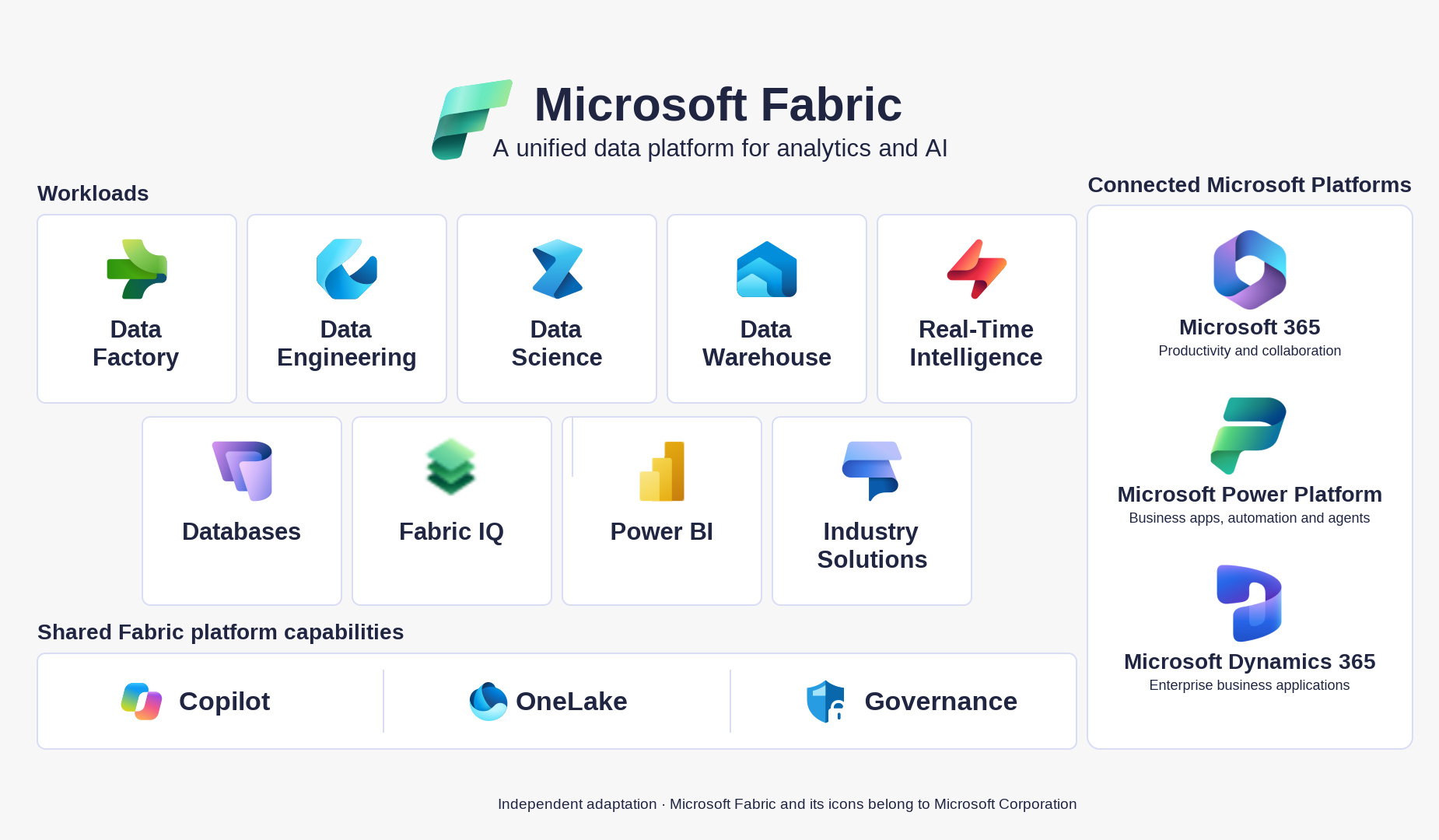
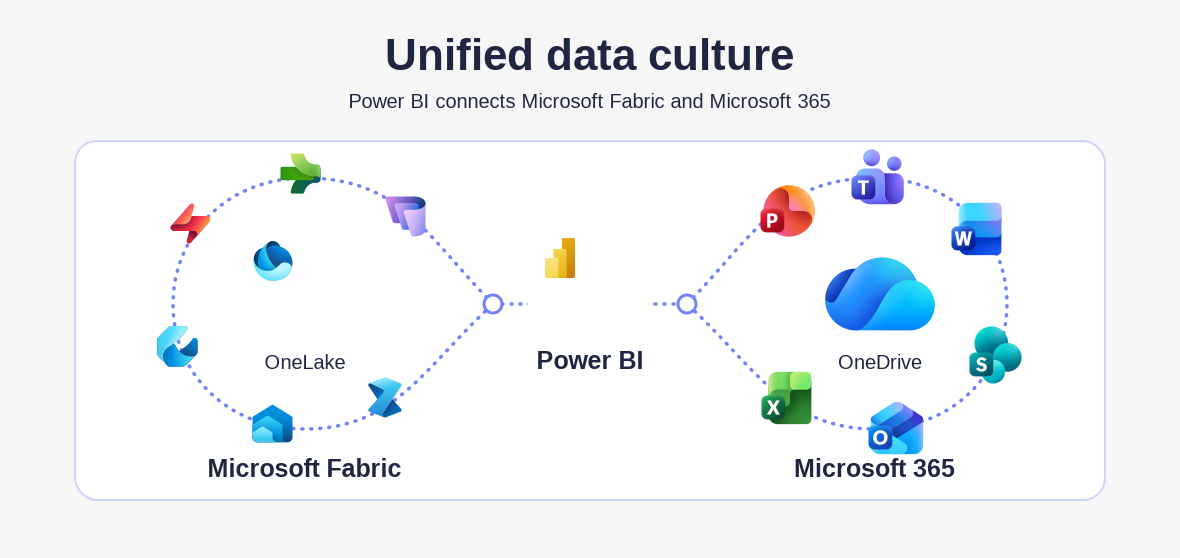
You can think of Microsoft Fabric as Microsoft 365 for organisational data. Just as Microsoft 365 provides a complete set of business productivity applications for everyday work with documents, spreadsheets and presentations, Microsoft Fabric provides a complete set of workloads for ingesting, transforming, modelling and analysing organisational data. Similarly, just as Microsoft 365 applications can store their documents, spreadsheets and presentations in OneDrive, Microsoft Fabric workloads use OneLake to store and share analytics data.
What is OneLake?
OneLake is the single, unified, intelligent data lake that Microsoft Fabric is built on. It gives organisations one place to store and govern data for analytics and AI and to unify their wider data estate. Microsoft automatically provisions one logical OneLake instance per Fabric tenant. Microsoft manages the underlying storage as data volumes grow, and individual Fabric workloads can automatically tune aspects of performance. Shortcuts virtualise data stored elsewhere, including outside Fabric. Supported workloads can query the data as if it were stored locally, without materialising a separate copy. Internal shortcuts read the same OneLake files, so query performance can be comparable to reading those files directly. For external shortcuts, performance also depends on the source, network latency and whether caching is available. The separately downloadable OneLake file explorer makes authorised workspaces and items accessible in Windows File Explorer. OneLake overview

What data challenges does Microsoft Fabric solve?
Microsoft developed Fabric to simplify data analytics. Data teams often spent too much time figuring out which tools worked together, how to connect them, and how to manage and license them. Fabric provides a unified set of analytics tools so data professionals can collaborate on one governed copy of the data and use it as a single source of truth, reducing silos and duplication.
With a shared source of trusted data, organisations can address a critical challenge: turning that data into competitive advantage. Fabric helps teams spot changes sooner and act on them. For example, a retailer can combine sales and inventory data to identify products at risk of selling out and replenish them before losing sales.
Reports also need to stay responsive as data volumes grow. Fabric provides Direct Lake, a high-performance storage mode for Power BI that solves a longstanding problem with Import and DirectQuery: how to provide responsive reports at scale without importing a full copy or sending each report query back to the source.
In supported experiences, built-in AI assistance uses data or model context to generate relevant queries and code, answer business questions, and suggest what to investigate next. This helps data teams build analytics faster and business users act on trusted insights sooner.
Data integration and simplifying analytics
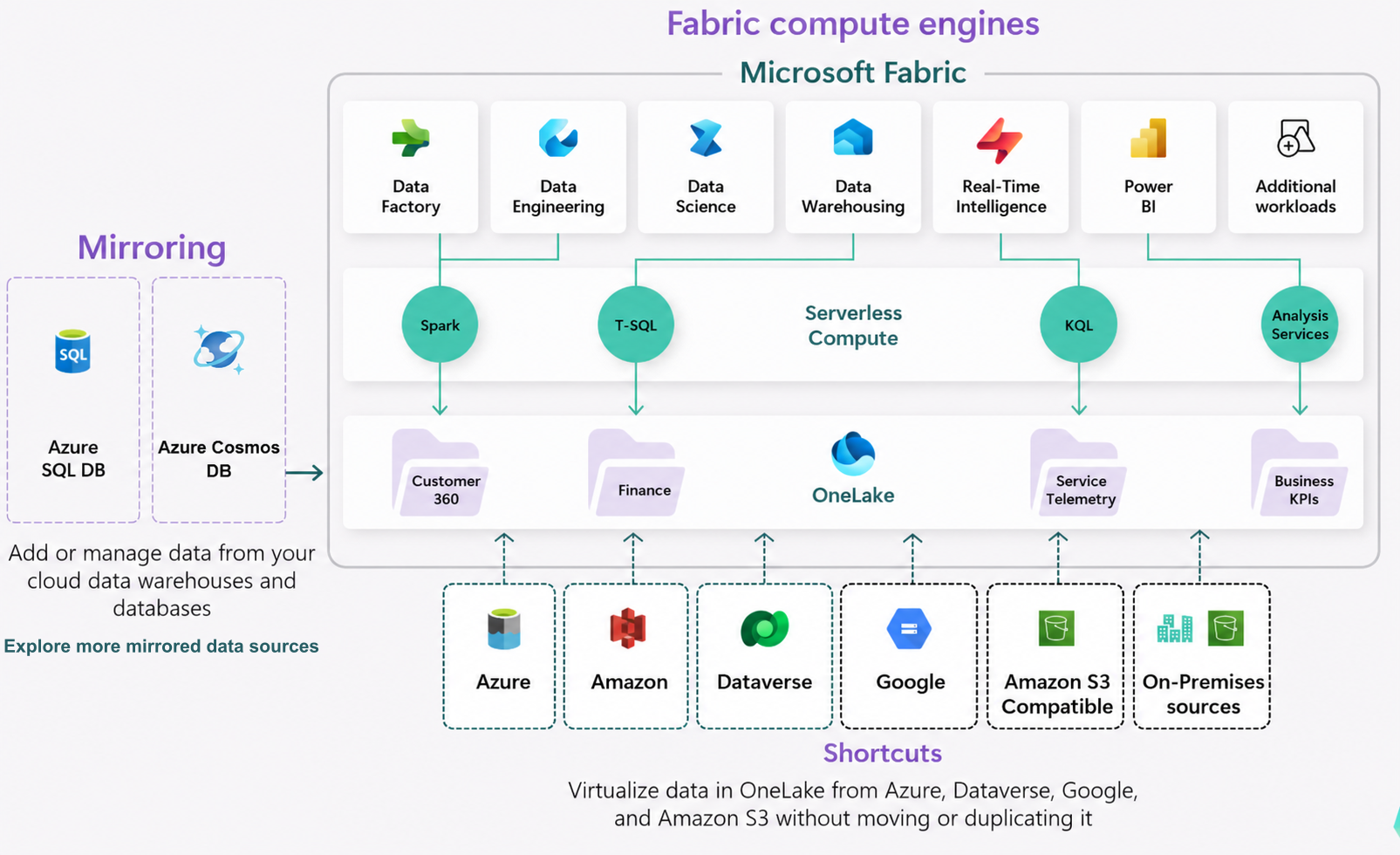
Fabric simplifies the work of connecting and operating analytics tools by providing a complete set of analytics workloads in one software-as-a-service platform, from data ingestion and engineering through data science, real-time analytics and Power BI. Fabric also provides a complete set of analytic compute engines, including Spark, T-SQL, KQL and Analysis Services, optimised to work with OneLake data storage formats. AI is built into the platform, with Copilot available in supported experiences. Data teams can work with common data and governance services instead of assembling every part of the analytics stack themselves. They still decide what to connect, who can use it, and how to size and operate their capacity.
Unifying data with OneLake to reduce silos and duplication
Historically, data teams across an organisation often built their own data stacks, leading to data silos and duplication. Data engineers prepared extracts, data scientists worked from snapshots, and data analysts rebuilt datasets for reporting. Business analysts and business users could then be left reconciling different figures or waiting for another extract. As copies multiplied across tools and departments, it became harder to keep data current, apply security consistently and agree on what a measure meant. With OneLake, authorised data teams can collaborate on the same governed copy of the data, so each team can use it for its own work without maintaining a separate copy.
Example: Breaking down data silos without duplicating data. Sales data can stay siloed in Finance if Marketing has to request a fresh copy for every analysis. Fabric lets Marketing discover the data, get approved access and reuse the same table. The Marketing data team discovers Finance's approved sales data in the OneLake catalog and requests access if needed. With the required permissions, Marketing creates an internal OneLake shortcut in its own lakehouse to the approved table in the Finance lakehouse. Marketing can use that table to analyse campaign performance, while Finance continues to maintain the source. The shortcut provides zero-copy access to the Finance table, so Marketing can use the current figures without maintaining a separate copy. Find data in the OneLake catalog
Accelerating analytics collaboration and development
Fabric helps data engineers, data scientists, data analysts and business analysts collaborate on shared, governed data in OneLake, using tools suited to their roles. For example, engineers can prepare sales data in a notebook, analysts can build a Power BI semantic model from that data, and business analysts can use the same measures to evaluate performance. In supported experiences, Copilot accelerates development by helping teams draft queries and code using data or model context, shortening the path from raw data to insights that business users can act on.
Microsoft Fabric Platform Capabilities and Scalability
Microsoft Fabric provides a complete set of capabilities to build powerful and flexible data architectures, solutions and workflows, and to perform end-to-end analytics, from ingestion and transformation to analysis and reporting.
Microsoft Fabric scales from the smallest microbusiness with simple reporting needs to the largest global enterprises. Data teams can reuse data in open formats through OneLake, control who can access it and share business definitions through semantic models. In supported experiences, Copilot can use data or model context to help users draft queries, explore results and decide what to investigate next. Fabric overview · How Copilot in Fabric works
Fabric lakehouses and warehouses can handle data at petabyte scale. Choose a Fabric analytical data store. Fabric Real-Time Intelligence also supports petabyte-scale data in motion, with Eventhouse hosting KQL databases for low-latency ingestion and analysis of events, logs and telemetry. Real-Time Intelligence overview
Direct Lake in Power BI
Direct Lake is a Power BI semantic model table storage mode that reads the Parquet files of supported Delta tables directly from OneLake. A semantic model refresh updates the model's references to the underlying Delta table files through a metadata operation called framing, which is typically much faster than a full Import refresh.
Before Direct Lake, Power BI semantic models used Import, DirectQuery or a combination of the two in a composite model. Import offers fast in-memory queries, but the model stores a copy of the data and must refresh it to reflect changes. DirectQuery translates report requests into source queries, such as SQL for a relational database, and uses the results to answer the report query. Performance depends in part on how quickly the source responds. A live connection connects a report to an existing semantic model, such as a published Power BI model or an Analysis Services model. Power BI connectivity options
Direct Lake avoids importing a full copy of the table and can answer queries from memory without a round trip to the source. When a report runs a query, Power BI loads only the required columns into its VertiPaq in-memory engine. Microsoft calls this on-demand loading and conversion of Parquet column data into VertiPaq format transcoding. Once the columns are in memory, Power BI can reuse them and deliver Import-like interactivity on tables with billions of rows, given sufficient capacity and a suitable table layout. Initial queries can take longer while columns load. Direct Lake on SQL endpoints can fall back to DirectQuery under some conditions. Direct Lake on OneLake runs exclusively in Direct Lake mode. How Direct Lake works
M365 Integration
Power BI bridges Fabric and Microsoft 365. Business users can explore governed Power BI data in Excel, present live reports in PowerPoint and discuss insights in Teams. This gives them access to trusted business metrics and actionable insights wherever work gets done and decisions are made. Power BI in Excel · Power BI in Teams
Dynamics 365 Integration
Through Microsoft Dataverse, Fabric can bring together data from front-office and back-office line-of-business applications. Link to Microsoft Fabric makes selected Dynamics 365 tables available in OneLake through shortcuts. This lets authorised teams analyse front-office CRM data from apps such as Dynamics 365 Sales and Customer Service alongside back-office ERP data from linked Dynamics 365 finance and operations apps. For example, teams can compare sales pipeline and customer service trends with orders, inventory and financial results. Link Dataverse to Microsoft Fabric
Microsoft Fabric timeline
- Pre-2023. Before the public preview at Build 2023, Fabric took shape internally and reached early users in a private preview under the name Project Trident. A Microsoft team member recalled more than two years of development work by the time Fabric shipped in 2023. Firsthand development account · Early preview participant
- 2023. Microsoft introduced Fabric in public preview at Build in May and announced general availability at Ignite in November. OneLake provided shared storage for the analytics workloads. Build keynote · Ignite Book of News
- 2024. Real-Time Intelligence reached general availability, bringing streaming, event analytics and actions together in Fabric. Microsoft announcement
- 2025. Microsoft introduced Fabric IQ in preview at Ignite. Fabric IQ brings organisational data and business meaning into the broader Microsoft IQ intelligence layer, alongside Work IQ, Foundry IQ and Web IQ. Ignite Book of News · Fabric IQ overview
- 2026. At FabCon + SQLCon Europe 2026, Microsoft announced two generally available integrations: Power BI data answers in Microsoft 365 Copilot Chat and the Fabric IQ plugin in Copilot Cowork. These release statuses apply to those integrations. Other Fabric IQ capabilities, such as ontology, remain in preview. FabCon + SQLCon Europe 2026 announcements
Microsoft Fabric workloads, engines and Items
A workload groups capabilities for a kind of work. An engine runs the computation or query. An Item is a resource in a workspace, such as a Lakehouse, Notebook or Report. Some Items appear under multiple workloads because they serve more than one purpose.
Each workload provides experiences tailored to different personas, such as data analysts and business analysts. These experiences give each persona tools suited to their tasks within a consistent and intuitive Fabric interface. For example, the Data Engineering workload includes a notebook experience where engineers can write and run Spark code to prepare data.
| Logo | Workload | Primary purpose | Example use case |
|---|---|---|---|
 | Data Factory | Ingest, copy and transform data. Use pipelines to coordinate steps and Dataflow Gen2 to prepare data with Power Query. | Load and prepare sales files overnight |
 | Data Engineering | Build lakehouses and use Spark notebooks or jobs to prepare and process data at scale. | Prepare clean Delta tables from raw records |
 | Data Science | Explore data, train and track experiments, and register machine learning models for reuse. | Train a demand forecast |
 | Data Warehouse | Build a relational analytics store and query governed data using T-SQL. | Publish governed sales tables for reporting |
 | Real-Time Intelligence | Ingest and analyse live events, monitor changing conditions and trigger actions when rules are met. | Alert staff to delayed dispatch events |
 | Databases | Support operational applications with transactional data stores and make supported data available for analytics. | Store order transactions for an operational app |
 | Fabric IQ | Add business context through entities, relationships and rules so people and agents can reason about how the organisation works. | Relate assets and sites in an ontology |
 | Power BI | Define shared business measures in semantic models and deliver insights through reports and apps. | Track delivery performance in a report |
 | Industry Solutions | Use industry-specific capabilities and solution templates as a starting point for industry use cases. | Start a healthcare analytics solution from a template |
| Logo | Platform | Primary purpose | Example use case |
|---|---|---|---|
 | Microsoft 365 | Productivity and collaboration | Explore a governed Power BI semantic model in Excel |
 | Microsoft Power Platform | Business apps, automation and agents | Analyse Dataverse data in Fabric through Link to Microsoft Fabric |
 | Microsoft Dynamics 365 | Enterprise business applications | Combine supported Dynamics 365 sales data from Dataverse with other data for Power BI reporting |
Fabric workloads and items at a glance
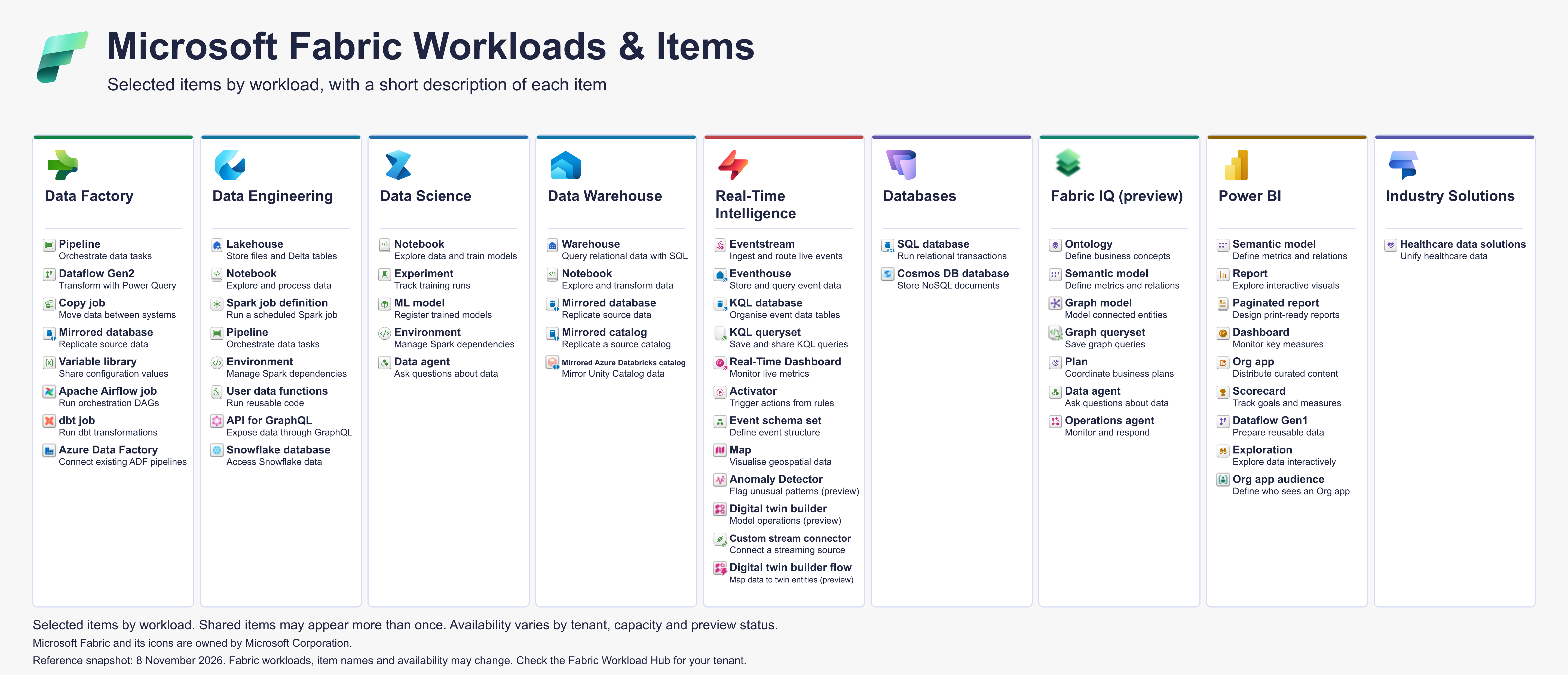
Graph model and Graph queryset appear under Fabric IQ in the graphic. Microsoft Fabric workload overview
OneLake, data stores and compute
Fabric separates storage from compute. Its analytics engines are designed to work directly with OneLake data in the open Delta Parquet format. This is the one-copy pattern. Once data is ingested or written as a supported Delta table, another engine can read it and use it in queries or transformations without making a separate input copy. For example, T-SQL can load sales data into a Fabric Warehouse, Spark can read that same table to analyse sales trends, and Power BI can report on it through Direct Lake. Writing changes back depends on the engine, the item and the user’s permissions. OneLake analytics engines. A Parquet file uploaded to a Files folder is distinct from a queryable Delta table. Some paths use a replica, index or materialised representation.
- Lakehouse. Store files and managed tables in OneLake. Data engineers can use Apache Spark to read and write Delta tables. The Lakehouse SQL analytics endpoint provides read-only T-SQL access to supported Delta table data. A medallion architecture organises data in OneLake into three layers: bronze preserves raw data, silver cleans and standardises it, and gold curates it for reporting and analytics. Medallion architecture in Fabric
- Warehouse. A high-performance data warehousing experience for building, querying and serving relational analytical models with T-SQL. The Warehouse SQL endpoint supports read and write access to Warehouse tables through T-SQL, including
INSERT,UPDATEandDELETE, subject to permissions. - Eventhouse. Use Kusto and KQL databases for event and telemetry analytics. Eventhouse can automatically index and partition incoming data.
- Operational databases. Use Fabric SQL database or Cosmos DB in Fabric for application data, with supported routes into analytics.
- Power BI. The semantic model defines relationships, measures and security. Direct Lake can read supported OneLake Delta tables for analytics without a traditional full import.
- Fabric Graph (generally available). Query a Graph model using GQL. Kusto also supports GQL on its own graph query surface. Fabric Graph release status
OneLake uses a unified namespace that identifies the workspace, Item and path. For example, https://onelake.dfs.fabric.microsoft.com/Sales/SalesData.Lakehouse/Files/orders.csv. Workspace and Item GUIDs are also available for integrations. Consistent names help people navigate, while GUIDs help integrations tolerate renaming.
For structured analytics data, Delta tables backed by Parquet are a common open format in OneLake. Parquet files store the data itself in a column-oriented format designed for efficient analytical reads. The Delta transaction log defines the table. It records the schema and which files each committed change adds or removes, so compatible readers know exactly which files make up a given version of the table. Fabric also connects with Azure SQL Database, external object storage and other platforms through the access and ingestion paths below. OneLake is managed and provisioned by default. Compute sizing, scaling and optimisation depend on the capacity and workload. Delta Lake in Fabric
How data gets into Fabric
Fabric gives data teams several ways to bring cloud and on-premises data into an analytics workflow. Fabric Data Factory offers more than 200 native connectors, with support varying by tool and source. The right approach depends on where the data lives, how fresh it needs to be, whether it needs transforming before use and whether Fabric can read the source format in place. A supported open format may suit a shortcut, while a proprietary operational format may suit mirroring if Fabric supports that source. Fabric workload overview
- OneLake shortcuts — Reference. Internal OneLake shortcuts reuse data already in OneLake. External shortcuts reference supported storage such as Azure Data Lake Storage or Amazon S3. Shortcut transformations can convert supported files into managed Delta tables. CSV, Parquet and JSON transformations are generally available. Excel file transformations and AI-powered transformations for text files are in preview. File transformations · AI-powered transformations
- Mirroring — Replicate. Built-in mirroring replicates data from supported operational sources such as Azure SQL Database into analytics-ready Delta tables in OneLake. This is useful when the source uses a proprietary format that Fabric analytics engines cannot read in place. The source continues to serve the operational application, and the replica gives analysts a copy they can query in an open format. Open Mirroring lets external systems or custom publishers deliver changes using Microsoft’s specification. Shortcuts and mirroring
- Data Factory (Copy job, Pipelines and Dataflow Gen2) — Copy and transform. Copy job handles straightforward movement. Data Factory Pipelines provide activities for copying data, branching on conditions, repeating steps in ForEach loops and invoking child pipelines. A pipeline can combine petabyte-scale data movement through Copy activities with the Power Query transformation engine by running Dataflow Gen2 as a pipeline activity. Fabric Data Factory capabilities · Run Dataflow Gen2 in a pipeline
- Eventstream in Real-Time Intelligence — Stream. Real-Time Intelligence uses Eventstreams to ingest, transform and route live events, and Eventhouse to analyse them. Event Schema Sets can define contracts for supported streaming scenarios.
Use a shortcut when supported data can be accessed in place. Use a pipeline when ingestion and preparation must be orchestrated across multiple sources or steps before a dataset is ready to publish. Microsoft’s Fabric ingestion guide
Discover, govern and deliver
The OneLake catalog helps people find and govern data. The Real-Time hub helps data teams discover streams and business events. The Database Hub (preview) provides a view of supported database estates and their operational signals. The Monitor hub helps data teams track runs and investigate failures.
OneLake Security uses configurable roles to control access. Enforcement depends on the item, query engine and access path. Object-level security controls which tables or folders users can access, column-level security controls which columns they can see, and row-level security filters which records they can see. These controls do not restrict workspace Admins, Members or Contributors. OneLake Security controls · Supported engines and access paths
Metadata discovery helps users find relevant assets, while Microsoft Purview can scan and classify supported data for sensitive information, including PII, where configured. Catalog discovery, Eventhouse indexing and Purview scanning serve different purposes.
The Fabric Admin portal is where central controls are managed. Administrators can delegate eligible settings to domain admins. Domains and subdomains organise workspaces by business area and can support a data mesh operating model in which data teams own data products within shared standards.
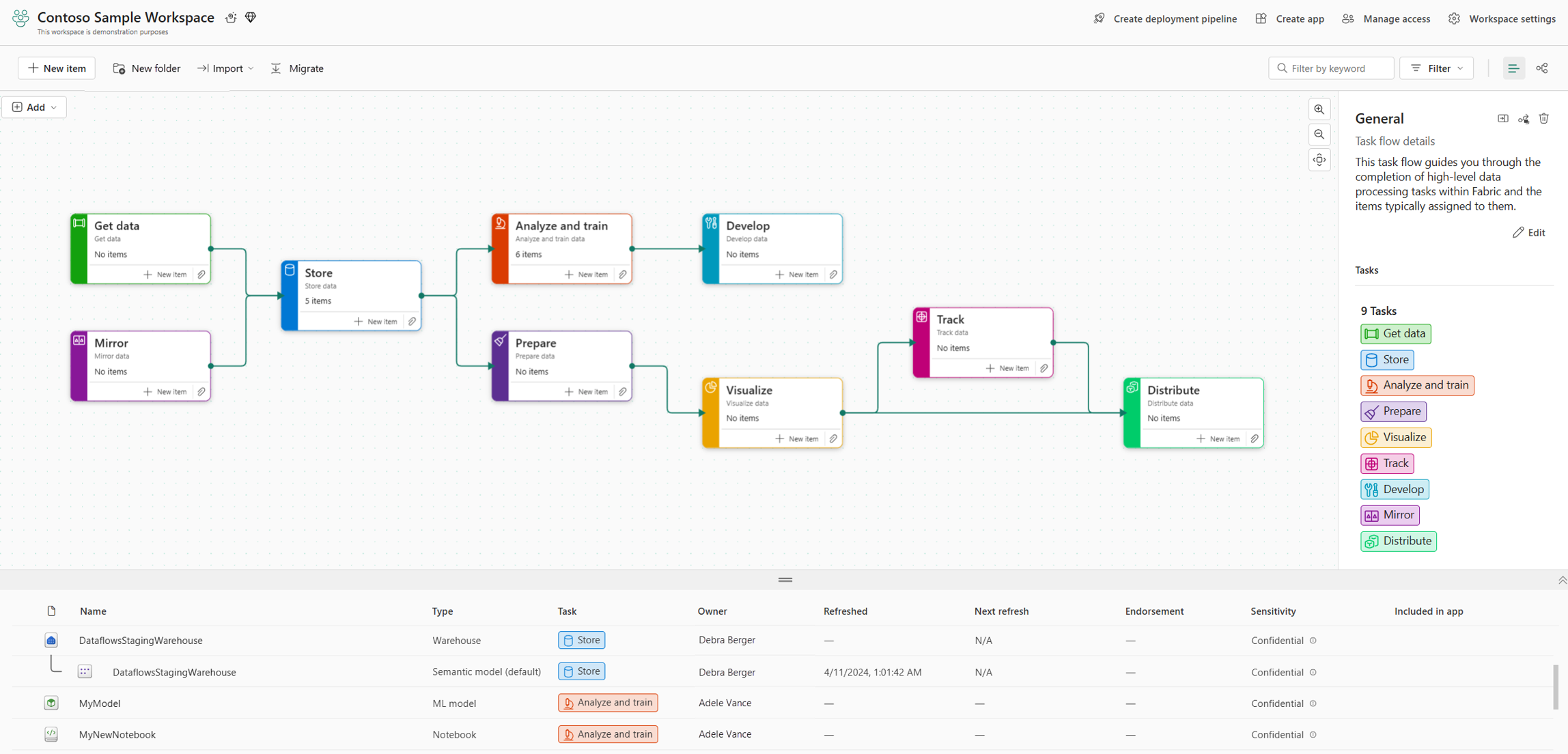
Task flows give data teams a visual map of their end-to-end data architecture and workflows within a Fabric workspace. Data teams can connect task cards for stages such as ingestion, preparation and reporting, then assign the relevant items to each card. Selecting a task card filters the workspace item list to the items assigned to that stage, making it easier to find the pipeline, lakehouse, notebook or report behind it. Work with task flows
For application lifecycle management, Git integration tracks changes to supported Items and Deployment Pipelines promote supported content through environments such as development, test and production. Agree who owns releases, data quality and access before moving a solution into production.
Capacity, licensing and getting started
Capacity provides compute for the workspaces and workloads assigned to it. Capacity sizing, per-user licensing and Copilot eligibility are separate decisions. Start with a representative workload sample, estimate compute with the Fabric SKU Estimator (preview), and validate actual usage in the Capacity Metrics app.
Provisioned F SKUs range from F2 (2 capacity units) to F8192 (8,192 capacity units) in Microsoft's sizing guide. F4096 provides 4,096 CUs. Fabric capacity sizes
Pay-as-you-go bills for the provisioned capacity while it runs. You can pause and resume it manually or on a schedule using Azure Automation runbooks. Pausing can make assigned content unavailable, and storage charges and outstanding compute usage can still apply. Capacity reservations offer a lower rate for matching compute usage in return for a one- or three-year commitment, which can suit workloads that run regularly. Pause and resume capacity · Fabric capacity reservations
Mirroring storage allowance. Database mirroring and open mirroring include up to 1 TB of replica storage per purchased CU while the capacity is running. For example, F64 includes up to 64 TB for mirrored replicas. Storage charges apply above the allowance or while the capacity is paused. Queries against mirrored data use compute at normal rates. Mirroring costs
F0 is Microsoft’s zero-provisioned capacity option for on-demand billing, announced in preview. Consumption is chargeable for supported operations. Microsoft’s Copilot documentation lists paid F2 or higher or P1 or higher, subject to applicable settings and region. Microsoft’s Copilot prerequisites do not list F0 as directly eligible. A separately designated eligible Copilot capacity is a distinct billing option. Fabric pricing · Copilot eligibility
From governed analytics to operational action
Semantic models give BI and AI a shared vocabulary
A semantic model captures what a business measure means, how tables relate and who may see the results. That gives business teams and supported AI experiences shared business context and understanding when answering business questions. For example, a dashboard, a report and an AI assistant can all use the same agreed definition of on-time delivery. Microsoft showed more than 22 million semantic models at FabCon and SQLCon Europe 2026. Fabric IQ ontology (preview) adds context about entities, relationships and operations, and Graph supports questions about those relationships. Barcelona keynote · Fabric IQ overview
Real-Time Intelligence connects events with decisions
Eventstreams and Eventhouse help data teams detect and analyse changes as they happen. Data agents answer questions over permitted data. Operations agents monitor conditions, suggest responses and can take configured actions. Activator is an Item within Real-Time Intelligence that applies rules to trigger alerts or workflows. Microsoft previously reported that nearly half of Fabric’s then 24,000-plus customers used RTI. Microsoft’s RTI adoption snapshot
Planning, writeback and apps bring work closer to analytics
Planning in Fabric brings enterprise performance management scenarios such as budgeting and forecasting closer to governed data. The Plan item is generally available. Fabric release notes. Translytical task flows can let a report user initiate a permitted operational update via User Data Functions. Org apps distribute curated content to audiences, while Fabric Apps (preview) lets developers build data-driven applications with the Rayfin SDK. Developers define data models in TypeScript, and Fabric Apps generates APIs and provides hosting and Microsoft Entra ID sign-in. Fabric Apps overview. Together these capabilities point towards Power BI becoming an entry point for action as well as analysis. Check the release status and availability for each capability before designing around it.
Copilot and agentic development
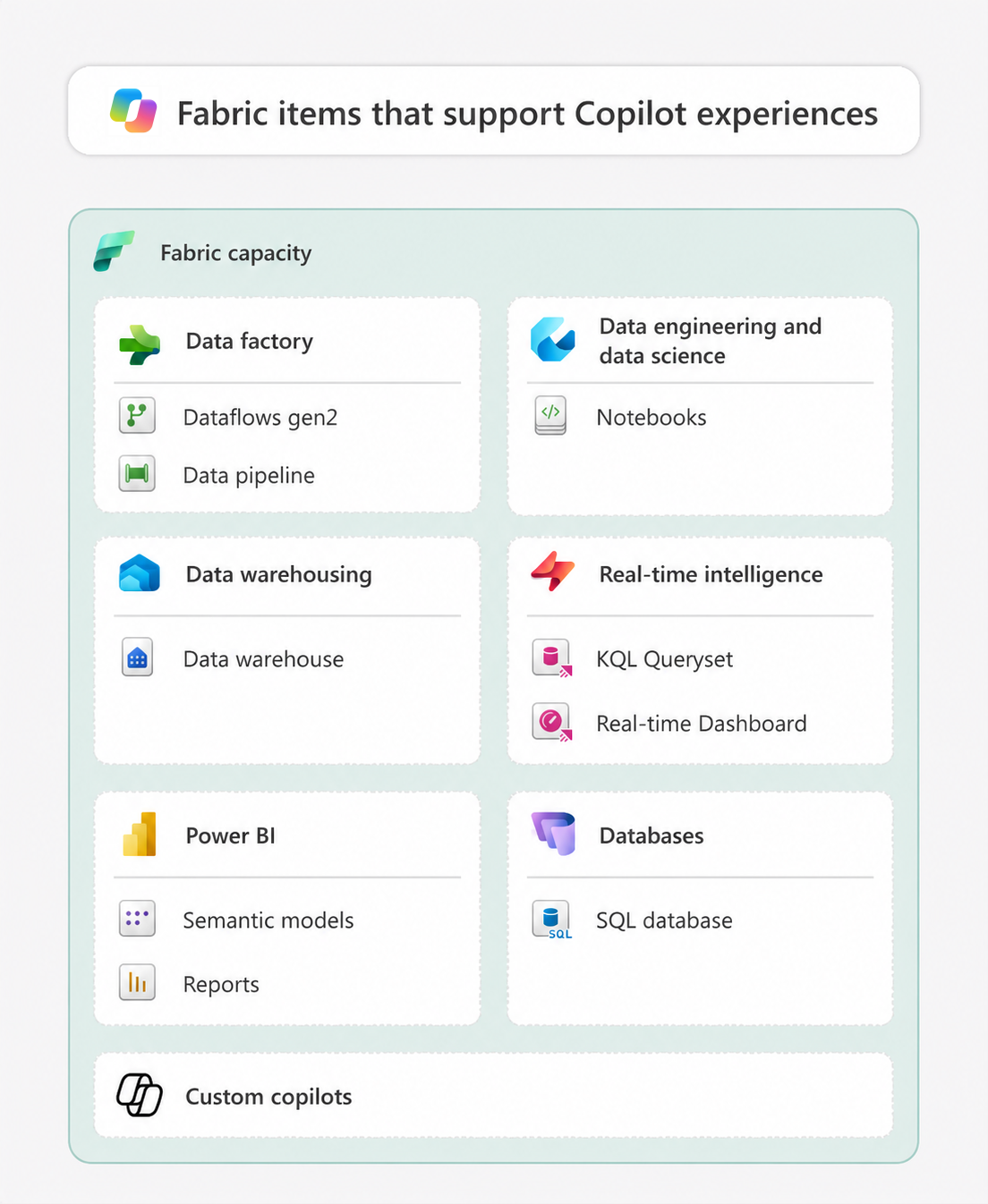
Copilot can help with authoring, queries and exploration across supported Fabric experiences. With conversational analytics, business users can ask questions in natural language and explore answers based on a Power BI semantic model they have access to. The development pattern in our Power Platform guide also applies here: a coding agent can work in an IDE or CLI and use Skills for Fabric for task guidance and Fabric MCP servers for access to supported tools and resources. The user’s permissions and the server’s capabilities define what the agent can do.
Project Osmos, the Fabric data engineering agent in preview, adds Fabric-hosted execution. A supported local coding agent submits a task through the Osmos skill, then Fabric runs it against Spark and OneLake. Work can continue after the client disconnects. Data teams can review the task plan, staged results and validation before promoting outputs. Project Osmos overview
A practical Fabric solution example
Consider a distributor that needs to spot late shipments early and explain their effect on delivery commitments. Mirror the relevant order data from Azure SQL Database, reference existing reference data with an internal or external shortcut, and stream dispatch events into Eventhouse. Define on-time delivery once in a governed semantic model. A Power BI report can track the measure, a Data agent can help staff ask about delays, and Activator can alert the team when an agreed threshold is crossed. An Operations agent can help investigate and suggest a response. Start with the decision, the data freshness it requires and who has authority to act.
BDATech365 can help define the requirements, evaluate design options and plan a representative Fabric pilot. Discuss your data or analytics challenge.
Resources
- Microsoft Fabric documentation and Microsoft Learn training for deeper coverage of individual workloads.
- End-to-end tutorials and workload samples, including NYC Taxi data for Data Factory, Adventure Works for Graph and bike rental events for RTI.
- Capacity planning for the Fabric SKU Estimator and Capacity Metrics app.
- Microsoft Power Platform 2026 guide for the related app, automation and analytics platform.
Key terms used in this guide
- Capacity
- Compute available to the workspaces and workloads assigned to it.
- Data lake
- A central store for large volumes of structured and unstructured data that teams can use for analytics and AI.
- Delta Parquet
- An open table format in which Parquet files store the data and the Delta transaction log tracks the schema and the files that belong to each table version.
- Direct Lake
- A Power BI semantic model storage mode that reads supported OneLake Delta tables and loads the columns needed by queries into memory.
- Item
- A workspace resource such as a Lakehouse, Pipeline or Report.
- Ontology
- A model of business entities and relationships that adds context to data.
- Semantic model
- A governed analytical layer that defines relationships, measures and security.
- Workload
- A grouping of Fabric capabilities for a particular kind of work.
About this reference
Independent BDATech365 structured introduction. Microsoft sources were last checked on 9 November 2026. The graphic shows selected Items, including shared Items where relevant. Availability, preview status, regional support and licensing may vary. Check current documentation and your tenant’s Workload Hub when making implementation decisions.
Microsoft Fabric and the Microsoft products, trademarks and icons shown belong to Microsoft Corporation. The compute engines illustration is Microsoft material and is credited in its caption. See our Copyright & Trademarks notice.